
Planet Zoo 2 Wildlife Reserves and Maps Guide
What are Wildlife Reserves?
Open the active project from the Planet Hub to work in a Wildlife Reserve. Build research infrastructure, restore its ecosystems, and prepare suitable animals in Release Groups before releasing them. Then monitor biodiversity goals and use research outposts and the vehicle to explore.
Open the reserve project in Planet Hub before planning. Read its ecosystem and release requirements, then build the listed research facilities and prepare eligible animals in Release Groups.
How reserve ratings and ecosystems work
Each reserve has a Biodiversity Rating made from two categories:
- Ecosystem Rating reflects restoration progress. Frontier lists Established and Flourishing ecosystems, pollution removal, invasive-flora removal, and species diversity as ways to improve it.
- Research Rating reflects how well the reserve can monitor and research released wildlife. The guide names Observation Platforms, Camera Traps, and Acoustic Monitors as research equipment to distribute around the reserve.
Prima Games separately describes the Biodiversity Rating as a five-star reserve performance measure and emphasizes balancing species roles, such as herbivores and predators. That is broad context; use Frontier’s category breakdown and your active project panel for the formal factors and release rules.
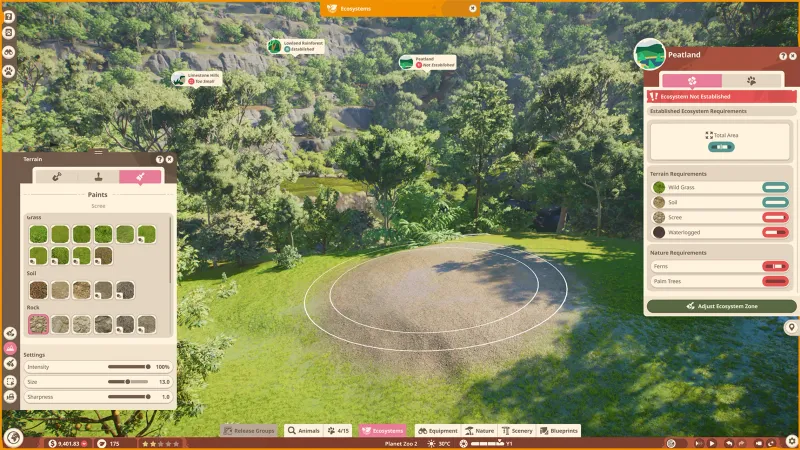
To establish an ecosystem, choose the Ecosystem Brush, select a type, and paint an area that satisfies its displayed area and environment requirements. The official guide notes that requirements can include terrain and nature conditions; some types also require water or a highland or lowland setting. Read the requirements shown for the selected ecosystem rather than treating one terrain recipe as universal.
Flourishing is a later state: an ecosystem must first be Established, and it needs animals that provide the relevant Ecosystem Roles. Check the roles listed on the Release Group before releasing animals. The official guide also advises removing pollution and invasive flora; both affect the ecosystem score.
Prepare and release animals
The official workflow is:
- Place a Research Outpost in the reserve before using its Release Groups screen.
- Open Release Groups in the reserve, or open Animal Trading & Storage in your zoo and choose its Release Groups screen.
- Create a group, choose an available species, and review any research requirement. Add eligible animals from storage and confirm the group’s ecosystem-role and other listed requirements.
- Finalize the group to begin acclimatization. Frontier warns that this step commits the animals to the reserve; they cannot be returned to the zoo.
- When the group is ready, choose Release to Reserve or the available Quick Release option. Select a suitable available reserve and the Established Ecosystem requested by the game.
Use the live group panel as the authority for species, research, ecosystem roles, and release eligibility. The public guide explains the workflow but does not give one fixed species list that applies to every project or save.
Explore and improve a reserve
Research Outposts act as the base for reserve expeditions. The official guide describes using the Research Vehicle, following the compass toward animal groups, and switching to On Foot mode to approach wildlife. It cautions that approaching animals can scare them. Research networks also help open Research Gates and unlock higher species-research levels, while properly established networks contribute to the Biodiversity Rating.
This makes reserve progress a combination of restoration and observation: establish suitable habitat, reduce environmental problems, release animals that satisfy the active goals, and spread monitoring equipment through the landscape. A strong result depends on the particular project’s displayed targets, so check the rating breakdown after each change to see which category is holding progress back.
Maps, regions, and the Scottish Highlands query
“Planet Zoo 2 maps” and “Planet Zoo 2 reserves” can refer to different things: the landscape available for a zoo, or a Wildlife Reserve conservation project with its own ecosystem and release requirements. Frontier’s Wildlife Reserves guide documents those systems, but the captured guide does not list every region or confirm a complete map roster.
Search results surfaced the official Wildlife Reserves Teaser Trailer associated with the Scottish Highlands query. That is a discovery lead, not enough evidence to claim the Highlands are the only reserve, to list all reserve maps, or to infer their animal rosters. The selected official Feature Focus video and Frontier’s guide are useful starting points; for the current playable region and objectives, open Planet Hub and inspect the reserve card in your game version.
What the public sources do not settle
The available official guide does not establish a full map list, a universal species-to-reserve table, or every project-specific threshold. It also does not prove that every teaser environment is selectable in every mode or save. Treat each reserve’s in-game project panel as the current source for availability and requirements.
- 01
Review the ecosystem
Check reserve requirements and the current rating.
- 02
Prepare animals and habitat
Use the in-game panels to address needs before release.
- 03
Release and improve
Review the reserve feedback and choose the next improvement.
Related guides
Sources
- [1]Wildlife Reserves - Guides - Planet Zoo 2 — Frontier Developments
Current official guide capture dated 2026-10-15; primary evidence for reserve systems and release steps.
- [2]Planet Zoo 2 Feature Focus: Wildlife Reserves — Planet Zoo 2 official YouTube channel
Selected official video from the existing 50-video transcript corpus; supplemental feature overview.
- [3]Planet Zoo 2 | Wildlife Reserves Teaser Trailer — Planet Zoo 2 official YouTube channel
Found through Serper Google Search API discovery for the Scottish Highlands query. Linked as a discovery lead only; no transcript was downloaded or used for claims because the 50-video corpus cap was reached.
- [4]How to Increase Planet Zoo 2 Wildlife Reserve Biodiversity Rating — Prima Games
Secondary context for the five-star rating and species-role balance; Frontier remains authoritative for the formal category breakdown.
- [5]Planet Zoo 2 official product listing — Frontier Developments / Steam
Product overview describes the Wildlife Reserves feature; does not enumerate every map.
Was this helpful?
Thanks for the feedback!